Satisfied Users
Fast-loading websites create smoother visits, reduce frustration, and help keep visitors engaged longer.
WordPress caching plugins help websites load faster by storing optimized versions of pages, reducing server work, improving user experience, and supporting better SEO performance. This guide compares six caching plugins built for different site owners, budgets, and technical comfort levels.

Almost every WordPress website needs some form of caching. Sometimes caching is handled at the hosting or server level, but a dedicated plugin can give website owners more control over page caching, browser caching, optimization, and performance settings.
Fast-loading websites create smoother visits, reduce frustration, and help keep visitors engaged longer.
Website speed is closely tied to search performance, crawl efficiency, and overall user experience signals.
Caching reduces repeated server processing, helping pages load faster with fewer resources.
Visitors rarely wait 10 or 15 seconds for a page to load, so faster performance can reduce bounce rates.
Everybody wants their website to load as fast as possible. Caching helps make that happen by saving prepared versions of pages and assets so WordPress does not need to generate every page from scratch for every visitor.
In some cases, your WordPress host may already handle caching at the server level. Even then, many site owners still benefit from a caching plugin because it can add practical controls for browser caching, optimization, database cleanup, file handling, and page performance.
A caching plugin alone will not fix every speed problem. Hosting quality, image optimization, page assets, scripts, database health, theme performance, and plugin bloat all affect load time. But the right caching plugin is often one of the fastest improvements a WordPress site owner can make.
Practical takeaway: Choose WP Rocket for the easiest premium experience, WP Super Cache for a trusted free option, Hummingbird for a feature-rich toolkit, Cache Enabler for lightweight free caching, WP Fastest Cache for simple checkbox-style setup, and W3 Total Cache for advanced users who want deeper performance controls.
After reviewing WordPress caching plugin options, these six tools stand out for helping improve website speed and performance. Each plugin approaches caching differently, so the best choice depends on whether you value simplicity, free access, premium support, advanced controls, or beginner-friendly setup.
| Plugin | Page Caching | Browser Caching | Database Optimization | Pricing |
|---|---|---|---|---|
| WP Rocket | Yes | Yes | Yes | From $49/year |
| WP Super Cache | Yes | Yes | No | Free |
| Hummingbird | Yes | Yes | No | From $5/year |
| Cache Enabler | Yes | No | No | Free |
| WP Fastest Cache | Yes | Yes | No | From $49.99/year |
| W3 Total Cache | Yes | No | No | $99/year |

WP Rocket is one of the most trusted premium caching plugins for WordPress. It is feature-rich, but it is also beginner-friendly because it begins working as soon as it is installed and activated.
That makes WP Rocket a strong choice for website owners who know caching is important but do not want to spend hours adjusting technical settings. It handles core caching tasks automatically while still offering controls for users who want to fine-tune performance.
The original article highlights WP Rocket as a premium plugin with multiple payment plans. Although free plugins exist, WP Rocket earns its place because it combines ease of use, strong optimization features, and professional-grade performance controls.

WP Super Cache is a free open-source caching plugin developed by Automattic, the company behind WordPress.com, WooCommerce, and Gravatar. Its reputation and wide usage make it one of the most recognizable WordPress caching plugins.
The plugin includes several caching modes. Simple Mode is the best fit for most WordPress users because it is easier and less risky to configure. Expert Mode gives developers more control through .htaccess modifications, making it better suited to users who are comfortable with technical performance work.
Because WP Super Cache is completely free, there are no paid add-ons or upgrade paths required. The tradeoff is that support may not feel as hands-on as premium plugin support, but it remains a strong all-around caching choice for many WordPress configurations.
Hummingbird is newer than some of the older WordPress caching plugins, but it brings a strong collection of performance tools. The original content describes it as feature-packed and worthy of inclusion among the best caching plugins.
Although Hummingbird may not compete with older plugins in total downloads, its functionality makes it a serious option. It is especially useful for site owners who want more than basic page caching and prefer a broader performance-focused toolkit.
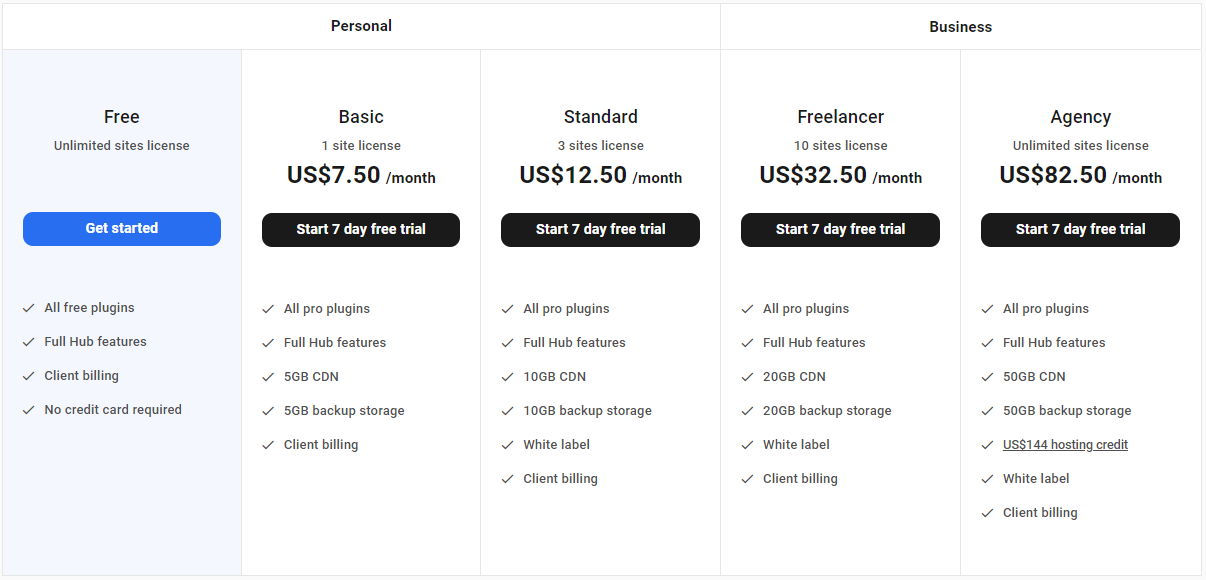
Hummingbird is available in both free and premium versions. The free version is available through WordPress, while premium options are offered through WPMU DEV plans.
Cache Enabler is a strong choice for users who want a top-notch caching plugin at no cost. It does not provide every premium feature available in paid caching plugins, but it can still be a practical way to improve WordPress speed.
The original article notes that Cache Enabler is available only as a free WordPress plugin and does not have a paid version. That makes it a useful option for users who want a lightweight caching solution without deciding between tiers or upgrades.
If browser caching is not important for your setup, Cache Enabler is a simple caching plugin worth testing.

WP Fastest Cache is a speedy free caching plugin with a premium version available for users who need more features. The original article recommends starting with the free version and upgrading only if you need the premium tools.
One of the strongest points of WP Fastest Cache is its settings experience. Its interface is simple and easy to work with, making it attractive for site owners who want to check a few boxes and activate the caching features they need.
The free version includes browser caching, and the premium version unlocks additional features through a one-time payment model.

W3 Total Cache is one of the most well-known WordPress caching plugins, with over one million active downloads noted in the original article. It includes a large set of features that can help improve website speed and SEO performance.
The main caution is that W3 Total Cache can be advanced to work with. Beginners may prefer another option from this list, while more confident users may appreciate the range of settings available for tuning WordPress performance.
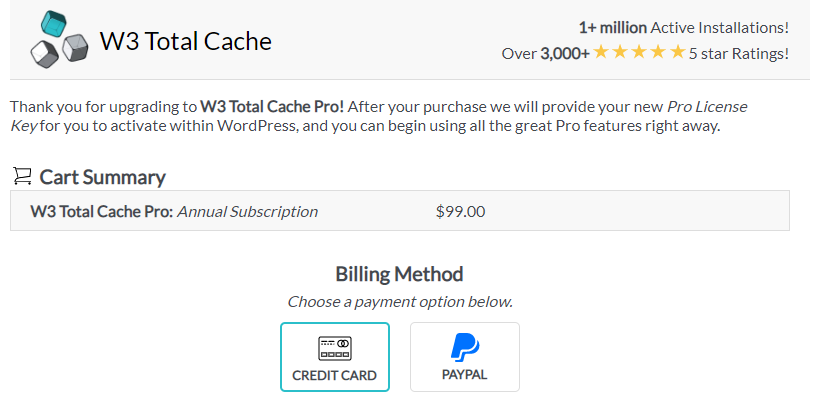
The free version is available for WordPress users. The premium version is listed at $99/year for a single-site license and is purchased through the plugin’s admin interface.
The best caching plugin depends on your experience level, budget, hosting environment, and the amount of performance control you want. Some users need a plugin that works quickly with minimal setup. Others need deeper configuration options and are comfortable adjusting advanced settings.
| Plugin | Best Choice When You Need | Possible Limitation |
|---|---|---|
| WP Rocket | A premium plugin that is easy to set up and strong enough for advanced optimization | No free version |
| WP Super Cache | A trusted free plugin from Automattic with simple and expert caching modes | Support and advanced extras are limited compared with premium tools |
| Hummingbird | A feature-rich caching and optimization toolkit with free and premium options | May be more than some small sites need |
| Cache Enabler | A lightweight free caching plugin without premium-plan decisions | Does not include every premium caching feature |
| WP Fastest Cache | An easy settings panel and free browser caching with one-time premium upgrades | Some stronger features require the premium version |
| W3 Total Cache | Advanced caching controls for users comfortable with more technical settings | Can feel complicated for beginners |
A good WordPress caching plugin can improve load speed, support SEO, reduce server resource usage, and create a better experience for visitors. WP Rocket is the most polished premium all-around option. WP Super Cache is a strong free choice. Hummingbird gives users a broader optimization toolkit. Cache Enabler is a lightweight free solution. WP Fastest Cache offers a simple interface and practical upgrade path. W3 Total Cache is best for users who want advanced configuration options.
Before choosing one, check whether your host already provides server-level caching, test one plugin at a time, and monitor speed, design behavior, analytics, and user experience after activation.
Use these quick answers to understand when caching plugins are useful, how they improve performance, and which option may be best for your WordPress website.
A WordPress caching plugin stores prepared versions of pages or assets so the server does not have to rebuild the same content from scratch every time someone visits. This can reduce load times and improve user experience.
Maybe. Some hosting providers already handle caching at the server level. In that case, adding another caching plugin may be unnecessary or even cause conflicts. Check your host’s caching system before activating a plugin.
WP Rocket and WP Fastest Cache are strong beginner-friendly options. WP Rocket is premium and highly automated, while WP Fastest Cache offers a simple settings interface and a free version.
WP Super Cache and Cache Enabler are strong free options. WP Super Cache is widely used and backed by Automattic, while Cache Enabler is a lightweight choice for simple caching needs.
No. Caching helps, but speed also depends on hosting, images, scripts, theme quality, plugin bloat, database health, and page structure. A caching plugin is an important step, not a complete performance strategy by itself.
Pick the caching plugin that fits your technical comfort level, test performance carefully, and combine caching with strong hosting, optimized images, clean assets, and regular site maintenance.
Learn How to Speed Up WordPress